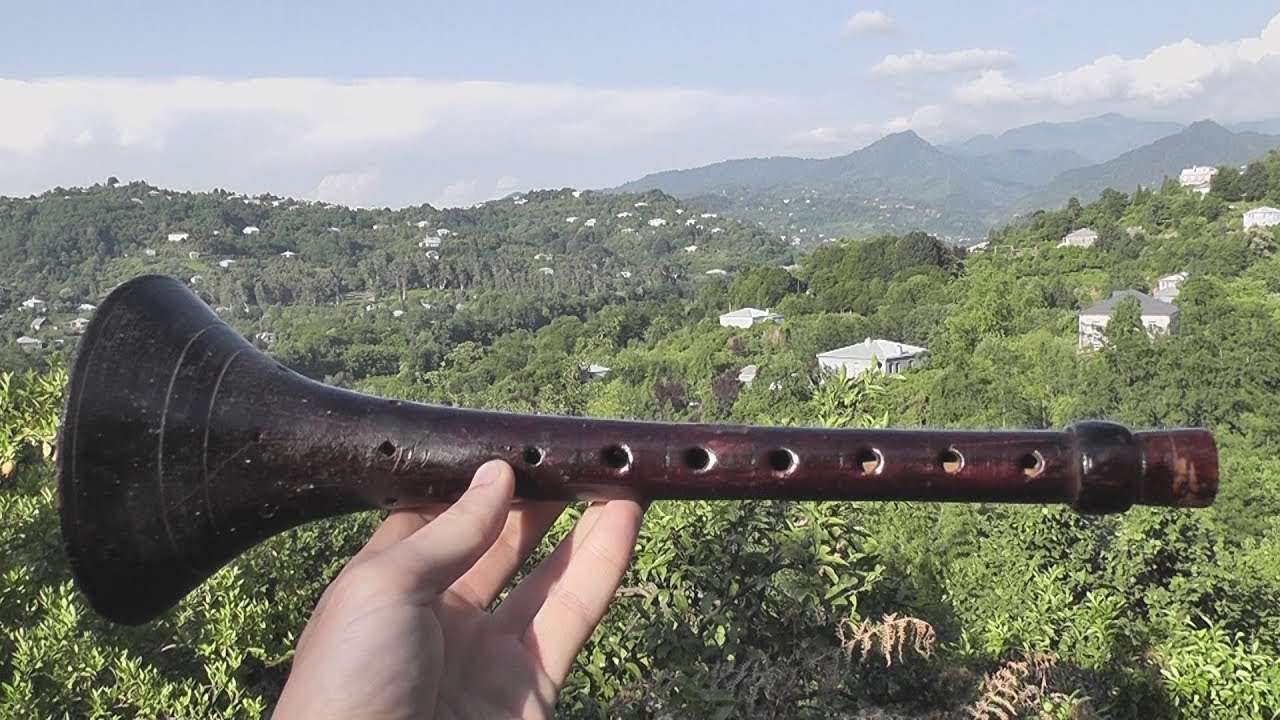
VitaShell
Большинство функций VitaShell и molecularShell совпадают, поэтому говоря об VitaShell, мы подразумеваем обе эти программы. В тех случаях, где не указано обратное.
Внешний вид и управление
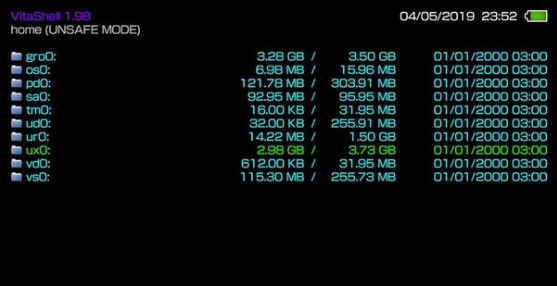
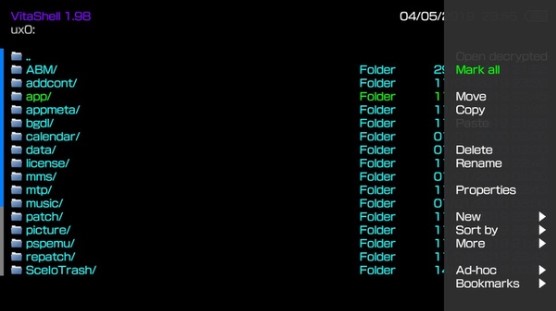
Главное меню программы представляет из себя перечень всех доступных пользователю разделов памяти консоли.
Основные разделы, которые необходимы для использования:
В левом верхнем углу (home (UNSAFE MODE)) отображена версия приложения, а так же каталог, в котором находиться пользователь и режим работы приложения.
Пометка UNSAFE MODE указывает на то, что включён пункт меню “Небезопасные приложения” в разделе “Настройки HENkaku” приложения “Настройки” приставки.
Пометка SAFE MODE указывает на то, что пункт меню “Небезопасные приложения” отключён, в таком случае будет доступен только раздел ux0:.
Настройки программы
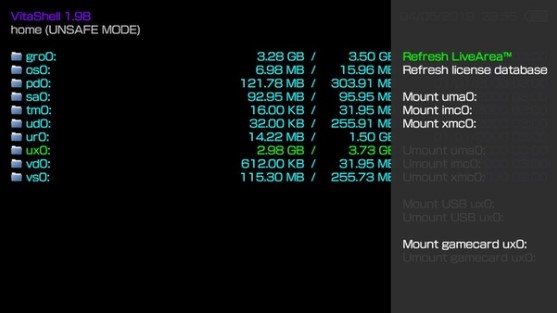
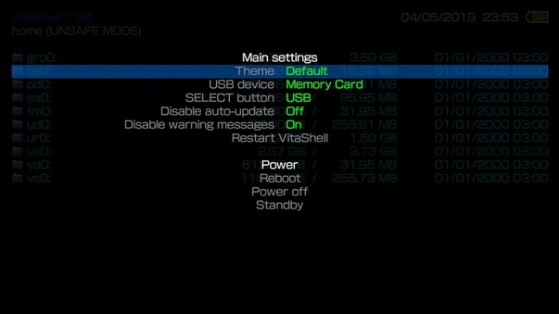
Установка файлов в формате VPK
Для поддержания порядка на носителе, мы рекомендуем скидывать vpk-файлы в папку VPK на вашей карте памяти. Разумеется, это может быть и другая папка
Перед началом установки множества файлов, рекомендуем зайти в меню программы и поставить значение пункта Disable warning messages в положение “On”, чтобы отключить навязчивые запросы о предоставлении расширенных прав.
Установка одного VPK-файла
Доступ к памяти приставки через ПК
molecularShell не поддерживает монтирование приставки к ПК в качестве носителя. Для получения доступа к памяти приставки используйте протокол FTP
Этот метод походит как для molecularShell, так и для VitaShell, поэтому ниже мы будем говорить просто “файловый менеджер”, имея ввиду обе эти программы
Как установить vita shell
Никита, Инструкция по обновлению:
Установите VitaShell 1.82 не удаляя предыдущую версию, если при установке выскочит ошибка, переименуйте VPK файл в ZIP и скопируйте файл eboot.bin по пути ux0:app/VITASHELL/eboot.bin (Я не знаю как только люди обновляются)


Максим, Инструкция по обновлению:
Установите VitaShell 1.82 не удаляя предыдущую версию, если при установке выскочит ошибка, переименуйте VPK файл в ZIP и скопируйте файл eboot.bin по пути ux0:app/VITASHELL/eboot.bin
Скачайте updater.vpk и PSP2UPDAT.PUP.
Если вы находитесь на прошивке ниже 3.60, обновите до 3.60 и установите эксплойт henkaku.
Показать полностью.
Если вы уже используете 3.60 HENkaku (Enso), удалите все плагины и удалите enso патч.
Перед тем, как удалить, рекомендуется сначала отсоединить карту памяти в настройках HENkaku, чтобы впоследствии ваша карта памяти не была ограничена из-за спуфа в ux0: id.dat.
Деинсталляция всех плагинов и патча enso чрезвычайно важна, поскольку они могут помешать процессу обновления, если включены.
Установите updater.vpk с помощью VitaShell и поместите файл PSP2UPDAT.PUP в ux0:app/UPDATE365/PSP2UPDAT.PUP.
Убедитесь, что ваша батарея заряжена не менее 50%.
Перезагрузите устройство, запустите HENkaku и сразу запустите программу обновления!
Следуйте инструкциям на экране и наслаждайтесь процессом обновления.
Когда обновление завершит установку новой прошивки, кастомные модули будут записаны в vs0: tai и взломанный загрузчик введенный в eMMC. Теперь вы на 3.65 HENkaku Ensō. Поздравляем!
PS Vita Mod
Once you have hacked your Vita, Vitashell will take the place of the content manager in allowing you to connect to your PC through USB or FTP server. If for whatever reason you lose access to VitaShell (such as formatting your memory card or accidental deletion) and did not back it up in QCMA, follow this guide to reinstall it. This guide is for Windows computer.
Files Needed
Content Manager (Default app on the Vita)
You need to have a PSN account linked to your Vita. If you never logged into your Vita before, just log into the PS Store ONCE. That’s all it takes to link your account.
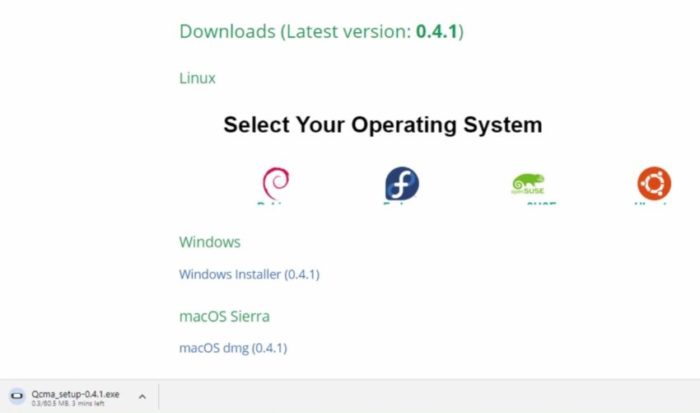
Step 1: Install Qcma
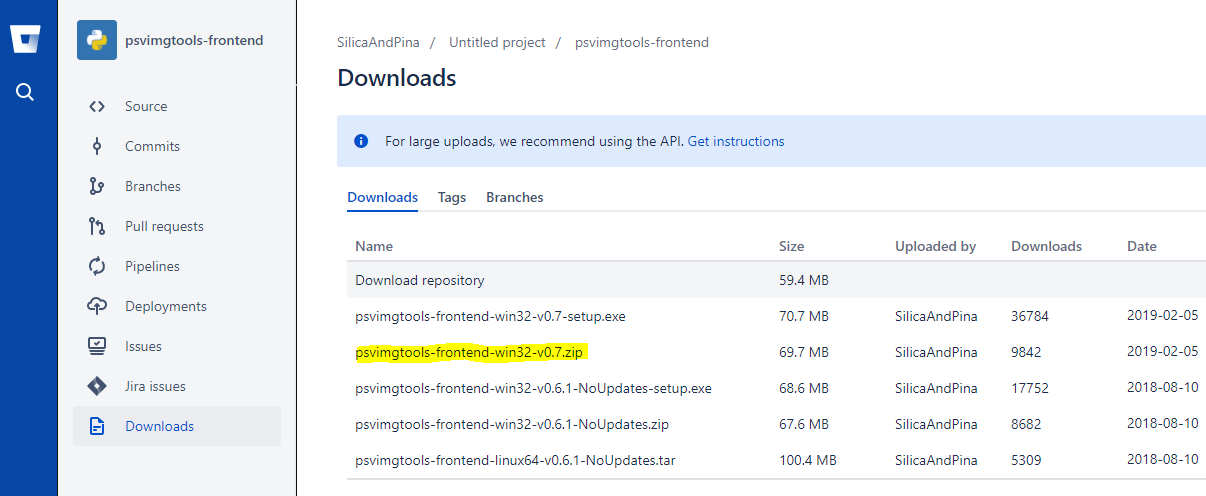
Step 2: Install PSVIMGTOOLS-FRONTEND.
Step 3: Run Qcma.
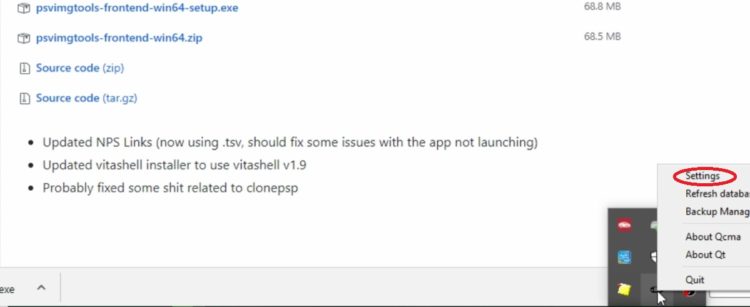
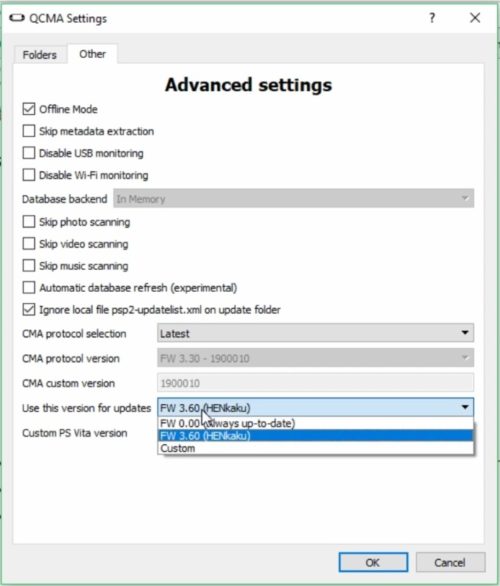
Step 4: Set up Qcma
Step 5: Launch Content Manager on PS Vita.
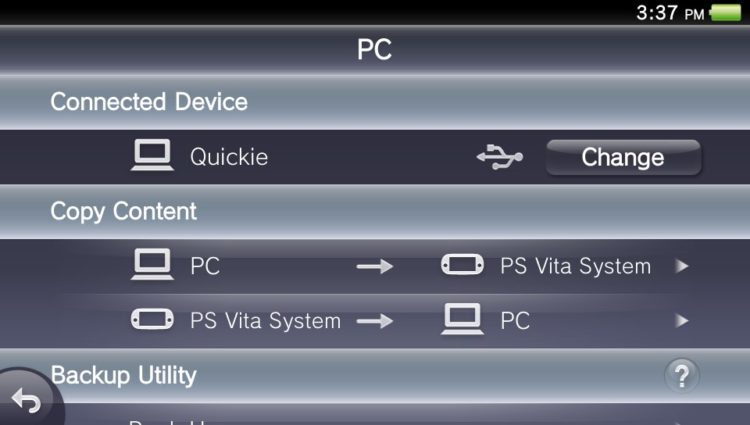
Note: If you are not connecting, see if you have USB charging on in settings and turn it off.
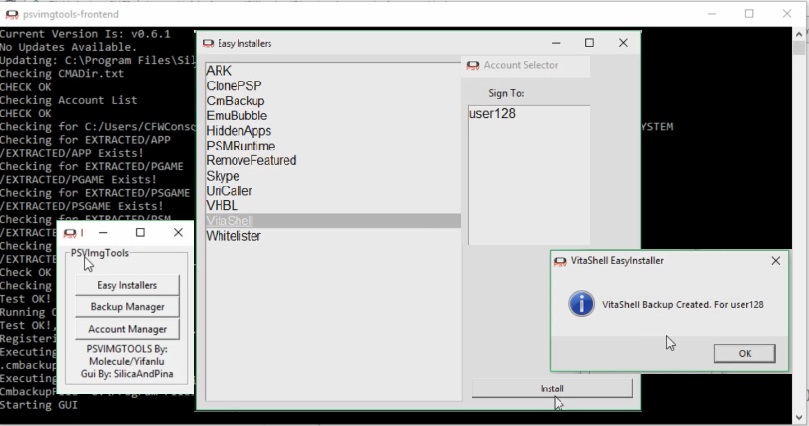
Step 6: Launch PSVImngTools.
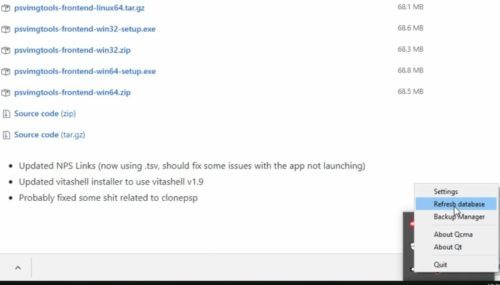
Step 7: Refresh database in Qcma.
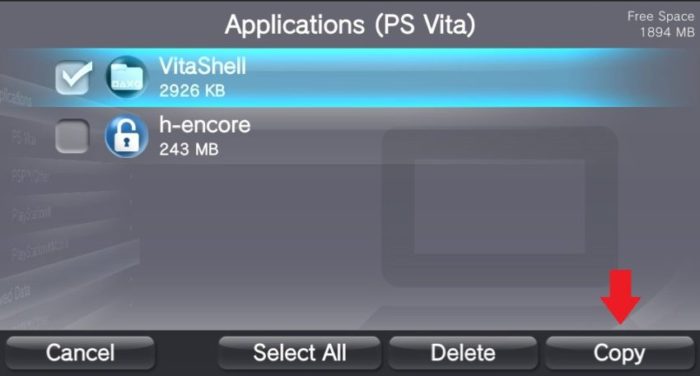
Step 8: Copy VitaShell Onto Your PS Vita.
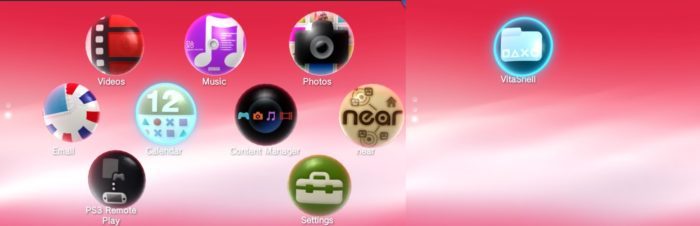
Step 9: Go Back out to the Home Screen.
225 thoughts on “Restore VitaShell”
I was quite prepared to write this method down as a better way to renew Vitashell when i’ts been lost to the user. After reading this and the issues folk are having, I can’t believe anyone would think this is easier than the method using FinalHE!
Using QCMA or Sony’s CMA and FinalHE, jailbreak the Vita AND copy across Vitashell all in the one process. Re-jailbreaking the Vita (or PSTV) isn’t harmful either so be confident this method is currently as of late 2021, the safest and best way to hack AND get Vitashell back up and running on your handheld console.
If the unit is already hacked, this process renews Vitashell so doesn’t matter if it was on there previously or not.
Initially now dayz, it is best to upgrade Vita to firmware 3.73, then before copying across the Bitter Smile exploit (FinalHE) place Vitashell.vpk in the same folder as FinalHE. It then shows up as an option to copy it across as well as the exploit. It’s a tiny tail-less arrow on the right wall of the FinalHE window. It’s all in the directions you all read before hacking your Vita in the first place.
That’s my understanding and I’ve just done it 3 times in the same week so it’s still fresh in my mind.
This was created about 3 years ago before finalHE was even created. This method was intended to be a last resort for users who messed up hacking their Vita and had to get back Vitashell. This issue with Hencore on 3.65 not installing Vitashell is pretty recent and not really the intended purpose of this page.
However, I do agree the method you outlined is the prefer method to get back Vitashell since it can be applied to both situations and users have mentioned on this page to use FinalHE to install Vitashell as their solution.
Thanks for providing some clear steps on what to do, hopefully that will help other users on here who are still having issue with Vitashell.
Would you happen to know how to install update files for Vita games?
I downloaded the Silent Hill Book of Memories game but I can’t get the update file to work in unison with the game.
Your help would be immensely appreciated. Thank you and have a great day.
Does the game title IDs between the Silent Hill game and the update match up? For example the game ID might be PCSB-00115.
Hi
I had to reset the memory card last week because somehow my screen was locked and was asking for a passcode.. maybe my daughter accidentally set a passcode.
I am on 3.65 i hacked my ps vita 1 year ago, i believe i need to restore Vitashell so i can install my games again.
Can you unlock your Vita? So you are on 3.65 but you lost all your mods and homebrew because you formatted your memory card? You should try to install Hencore again, look at my guide here on how to: https://psvitamod.com/auto-install-h-encore-on-3-69/
No you should not link to PSN because it will force you to update first and that would cause system issues and perhaps make it unusable.
Did you ever log into your PSN account?
I discovered why VitaShell was’nt showing up on the content manager (step 8). I’m writing this because this worked for me and maybe this can work for someone else.
1- Don’t run the PSVImgTools as admin, just double click it. (at least for me admin did not work well).
2- When the message “VitaShell Backup created” appear, DON’T click “OK”, just leave the pop up there.
Doing this, when i selected “PC —> PS Vita System / Applications / PS Vita” in the content manager, the VitaShell finally showed up (was around
3000KB I think) after that, i just selected it and copied to the system and it worked!.
I used the “FW 0.00 (Always up-to-date)” option on QCMA.
My firmware is 3.65 (If you have downgraded recently, be sure to log again into your PSN on your vita, when i downgraded the firmware my PSN ID vanished for some reason).
I was following the “Retro Game Corps” guide also, just like most people, and now everything works!
This worked for me and i hope this help others.
Thanks for sharing, hopefully this will help everyone else too!
I can’t find Vitashell on Step 8: Copy VitaShell Onto Your PS Vita.
All I can really say is make sure the original PSN account is selected and active. However, I don’t think psvimgtools can recover Vitashell if it never was installed in the first place. This guide is to recover Vitashell after it is already installed.
Any advice on vitashell just not showing up when trying to download through content manager?
All I can really say is make sure the original PSN account is selected and active. However, I don’t think psvimgtools can recover Vitashell if it was never was installed in the first place. This guide is to recover Vitashell after it is already installed.
came here from the retro game corp guide due to henku not installing vita shell. Followed the steps, i got all the way down to step 8. The vita shell file is only 5kb and when I try to copy vita shell to the Vita, and I get error c2-12858-4. and the whole process stops.
I’m on software 3.65 as per the guide i used, and not sure where to go from there.
Cool didn’t realized that channel was referring to my guide. Unfortunately, I am not sure if PSVimgtools can restore Vitashell if it never was installed in the first place. Other users have mentioned using Auto_Hencore to install a physical copy of Vitashell.
c ould u elaborate further? ive had this problem as well and im not understanding what u did to fix it
I’m currently stuck at step 8 right now.
I have done everything correctly, I refreshed the database from Qcma, but the Vitashell doesn’t appear in the Content Management on the PSVita
There was no error or anything appearing.
My PSVita is running downgraded 3.65 from 3.73 now.
Yes this is a very common problem that I am not sure psvimgtools is fixing. psvingtools and this guide is more for restoring Vitashell that was lost not for Vitashell that were never installed in the first place.
I downloaded 3.60, but when I try to install VitaShell through h-encore I got an error message. Now when trying to start h-encore it simply crashes (even when holding R button) and system restarts. Tried following the guide to restore VitaShell, but when connecting to PC to copy files it prompts me to update system, then says the latest version is already installed (C3-12049-6).
Did you meant to say 3.65? Hencore is not used for users on 3.60, if you are on 3.60 go here: https://psvitamod.com/install-enso-on-firmware-3-60/
Are you on firmware 3.65 and trying to install Vitashell?
Me too stuck here after doing same thing for 7 hours…
What firmware are you on and what caused you to lose Vitashell?
install henkaku again then open vitashell. worked for me when i got that error
H Encore2 est connu pour planter beaucoup, il vous suffit de réessayer. J’ai lu que cela peut prendre jusqu’à 30 fois.
so far im just tryin ng to get the vita shell but doesn’t show on the my psvita storage do I actually need to downgrerade to 3.60 in order to get my version is at 3.65 because I was watching youtube to jailbreak my vita and to start getting emulators and other things as well so that I’m able to enjoy playing I just need help with the whole process.
3.60 is the easiest way to hack the Vita and install Vitashell.
hello im stuck at step 6 i downloaded psvimgtools-frontend-win32-v0.7.zip, i extracted everything but what exactly do i need to run? the run.exe only opens a black screen with cilica messages, i didnt get any pop up, what should i do?
Are you running as admin, is your firewall or antivirus blocking it, did you also install QCMA?
Try refreshing the QCMA database, if that doesn’t work see the comment by user Asjata, download a zipped version of Vitashell and have FinalHe install Vitashell for you.
ive followed this guide step by step doing everything it says and it still gives me the error “could not copy some items you can only copy applications that your account is owner of ” and yes it is the same account no one elses is on my vita if someone can please lmk a fix to this it would be great been at it for the last 3 hours
Another user Asjata mentioned downloading a zip version of Vitashell and having FinalHe manually install it.
Hello, I’ve followed the directions but once at step 8, after opening the content manager I don’t have a VitaShell file to select and copy to the system. As far as I can tell, I’ve done everything correctly and currently have the system downgraded to 3.65.
Can anyone be able to tell me what I may have done wrong to be missing the VitaShell file?
Do you get an error about having the wrong account? Another user Asjata mentioned downloading a zip version of Vitashell and having FinalHe manually install it.
I was able to work it out and got VitaShell back on the system. Thank you for replying quickly!
can you tell me how im still getting the error
I’m still trying to figure it out as well. Where is this zipped vitashell file being found?
This guide has it, I will work on creating my own guide for this. I don’t think psvingtools can restore Vitashell if it was never installed on the Vita in the first place. A lot of these issues are from users not being able to install Vitashell from Hencore on 3.65.
https://vita.hacks.guide/installing-h-encore.html
Hello, I’ve followed the guide and made sure that I´m using the PSN account linked to my Vita, but when I use “Easy Installers”, vitashell doesn’t appear when I try to copy it to the Vita.
I don’t know what to do anymore, I don’t know how to install the vitashell as h-encore doesn’t work either
Is QCMA working for you? Do you get any error message? Do you know if your Vita can be downgraded to 3.60, because the only other solution is to update to 3.73 and then downgrade to 3.60 because it is much easier to hack the Vita on 3.60.
QCMA is working and I don’t get any error message, I ended up keeping Vitashell from before I downgraded from 3.73. That being said, Vitashell 2.02 doesn’t show “uma0” now. If I can’t fix it, I’ll see if I can downgrade to 6.0.
Thank you for answering.
Hi, i downgraded my vita from 3.73 to 3.65 and im having the same issue others are where i get error 0x80whatever when i try to install vitashell.
I follow this guide and it detects my PSN account properly but when i goto transfer vitashell to the psvita…its a 5kb file and fails to transfer.
Is the PSN account you selected the account linked to the Vita?
PS Vita Mod
Once you have hacked your Vita, Vitashell will take the place of the content manager in allowing you to connect to your PC through USB or FTP server. If for whatever reason you lose access to VitaShell (such as formatting your memory card or accidental deletion) and did not back it up in QCMA, follow this guide to reinstall it. This guide is for Windows computer.
Files Needed
Content Manager (Default app on the Vita)
You need to have a PSN account linked to your Vita. If you never logged into your Vita before, just log into the PS Store ONCE. That’s all it takes to link your account.
Step 1: Install Qcma
Step 2: Install PSVIMGTOOLS-FRONTEND.
Step 3: Run Qcma.
Step 4: Set up Qcma
Step 5: Launch Content Manager on PS Vita.
Note: If you are not connecting, see if you have USB charging on in settings and turn it off.
Step 6: Launch PSVImngTools.
Step 7: Refresh database in Qcma.
Step 8: Copy VitaShell Onto Your PS Vita.
Step 9: Go Back out to the Home Screen.
225 thoughts on “Restore VitaShell”
I was quite prepared to write this method down as a better way to renew Vitashell when i’ts been lost to the user. After reading this and the issues folk are having, I can’t believe anyone would think this is easier than the method using FinalHE!
Using QCMA or Sony’s CMA and FinalHE, jailbreak the Vita AND copy across Vitashell all in the one process. Re-jailbreaking the Vita (or PSTV) isn’t harmful either so be confident this method is currently as of late 2021, the safest and best way to hack AND get Vitashell back up and running on your handheld console.
If the unit is already hacked, this process renews Vitashell so doesn’t matter if it was on there previously or not.
Initially now dayz, it is best to upgrade Vita to firmware 3.73, then before copying across the Bitter Smile exploit (FinalHE) place Vitashell.vpk in the same folder as FinalHE. It then shows up as an option to copy it across as well as the exploit. It’s a tiny tail-less arrow on the right wall of the FinalHE window. It’s all in the directions you all read before hacking your Vita in the first place.
That’s my understanding and I’ve just done it 3 times in the same week so it’s still fresh in my mind.
This was created about 3 years ago before finalHE was even created. This method was intended to be a last resort for users who messed up hacking their Vita and had to get back Vitashell. This issue with Hencore on 3.65 not installing Vitashell is pretty recent and not really the intended purpose of this page.
However, I do agree the method you outlined is the prefer method to get back Vitashell since it can be applied to both situations and users have mentioned on this page to use FinalHE to install Vitashell as their solution.
Thanks for providing some clear steps on what to do, hopefully that will help other users on here who are still having issue with Vitashell.
Would you happen to know how to install update files for Vita games?
I downloaded the Silent Hill Book of Memories game but I can’t get the update file to work in unison with the game.
Your help would be immensely appreciated. Thank you and have a great day.
Does the game title IDs between the Silent Hill game and the update match up? For example the game ID might be PCSB-00115.
Hi
I had to reset the memory card last week because somehow my screen was locked and was asking for a passcode.. maybe my daughter accidentally set a passcode.
I am on 3.65 i hacked my ps vita 1 year ago, i believe i need to restore Vitashell so i can install my games again.
Can you unlock your Vita? So you are on 3.65 but you lost all your mods and homebrew because you formatted your memory card? You should try to install Hencore again, look at my guide here on how to: https://psvitamod.com/auto-install-h-encore-on-3-69/
No you should not link to PSN because it will force you to update first and that would cause system issues and perhaps make it unusable.
Did you ever log into your PSN account?
I discovered why VitaShell was’nt showing up on the content manager (step 8). I’m writing this because this worked for me and maybe this can work for someone else.
1- Don’t run the PSVImgTools as admin, just double click it. (at least for me admin did not work well).
2- When the message “VitaShell Backup created” appear, DON’T click “OK”, just leave the pop up there.
Doing this, when i selected “PC —> PS Vita System / Applications / PS Vita” in the content manager, the VitaShell finally showed up (was around
3000KB I think) after that, i just selected it and copied to the system and it worked!.
I used the “FW 0.00 (Always up-to-date)” option on QCMA.
My firmware is 3.65 (If you have downgraded recently, be sure to log again into your PSN on your vita, when i downgraded the firmware my PSN ID vanished for some reason).
I was following the “Retro Game Corps” guide also, just like most people, and now everything works!
This worked for me and i hope this help others.
Thanks for sharing, hopefully this will help everyone else too!
I can’t find Vitashell on Step 8: Copy VitaShell Onto Your PS Vita.
All I can really say is make sure the original PSN account is selected and active. However, I don’t think psvimgtools can recover Vitashell if it never was installed in the first place. This guide is to recover Vitashell after it is already installed.
Any advice on vitashell just not showing up when trying to download through content manager?
All I can really say is make sure the original PSN account is selected and active. However, I don’t think psvimgtools can recover Vitashell if it was never was installed in the first place. This guide is to recover Vitashell after it is already installed.
came here from the retro game corp guide due to henku not installing vita shell. Followed the steps, i got all the way down to step 8. The vita shell file is only 5kb and when I try to copy vita shell to the Vita, and I get error c2-12858-4. and the whole process stops.
I’m on software 3.65 as per the guide i used, and not sure where to go from there.
Cool didn’t realized that channel was referring to my guide. Unfortunately, I am not sure if PSVimgtools can restore Vitashell if it never was installed in the first place. Other users have mentioned using Auto_Hencore to install a physical copy of Vitashell.
c ould u elaborate further? ive had this problem as well and im not understanding what u did to fix it
I’m currently stuck at step 8 right now.
I have done everything correctly, I refreshed the database from Qcma, but the Vitashell doesn’t appear in the Content Management on the PSVita
There was no error or anything appearing.
My PSVita is running downgraded 3.65 from 3.73 now.
Yes this is a very common problem that I am not sure psvimgtools is fixing. psvingtools and this guide is more for restoring Vitashell that was lost not for Vitashell that were never installed in the first place.
I downloaded 3.60, but when I try to install VitaShell through h-encore I got an error message. Now when trying to start h-encore it simply crashes (even when holding R button) and system restarts. Tried following the guide to restore VitaShell, but when connecting to PC to copy files it prompts me to update system, then says the latest version is already installed (C3-12049-6).
Did you meant to say 3.65? Hencore is not used for users on 3.60, if you are on 3.60 go here: https://psvitamod.com/install-enso-on-firmware-3-60/
Are you on firmware 3.65 and trying to install Vitashell?
Me too stuck here after doing same thing for 7 hours…
What firmware are you on and what caused you to lose Vitashell?
install henkaku again then open vitashell. worked for me when i got that error
H Encore2 est connu pour planter beaucoup, il vous suffit de réessayer. J’ai lu que cela peut prendre jusqu’à 30 fois.
so far im just tryin ng to get the vita shell but doesn’t show on the my psvita storage do I actually need to downgrerade to 3.60 in order to get my version is at 3.65 because I was watching youtube to jailbreak my vita and to start getting emulators and other things as well so that I’m able to enjoy playing I just need help with the whole process.
3.60 is the easiest way to hack the Vita and install Vitashell.
hello im stuck at step 6 i downloaded psvimgtools-frontend-win32-v0.7.zip, i extracted everything but what exactly do i need to run? the run.exe only opens a black screen with cilica messages, i didnt get any pop up, what should i do?
Are you running as admin, is your firewall or antivirus blocking it, did you also install QCMA?
Try refreshing the QCMA database, if that doesn’t work see the comment by user Asjata, download a zipped version of Vitashell and have FinalHe install Vitashell for you.
ive followed this guide step by step doing everything it says and it still gives me the error “could not copy some items you can only copy applications that your account is owner of ” and yes it is the same account no one elses is on my vita if someone can please lmk a fix to this it would be great been at it for the last 3 hours
Another user Asjata mentioned downloading a zip version of Vitashell and having FinalHe manually install it.
Hello, I’ve followed the directions but once at step 8, after opening the content manager I don’t have a VitaShell file to select and copy to the system. As far as I can tell, I’ve done everything correctly and currently have the system downgraded to 3.65.
Can anyone be able to tell me what I may have done wrong to be missing the VitaShell file?
Do you get an error about having the wrong account? Another user Asjata mentioned downloading a zip version of Vitashell and having FinalHe manually install it.
I was able to work it out and got VitaShell back on the system. Thank you for replying quickly!
can you tell me how im still getting the error
I’m still trying to figure it out as well. Where is this zipped vitashell file being found?
This guide has it, I will work on creating my own guide for this. I don’t think psvingtools can restore Vitashell if it was never installed on the Vita in the first place. A lot of these issues are from users not being able to install Vitashell from Hencore on 3.65.
https://vita.hacks.guide/installing-h-encore.html
Hello, I’ve followed the guide and made sure that I´m using the PSN account linked to my Vita, but when I use “Easy Installers”, vitashell doesn’t appear when I try to copy it to the Vita.
I don’t know what to do anymore, I don’t know how to install the vitashell as h-encore doesn’t work either
Is QCMA working for you? Do you get any error message? Do you know if your Vita can be downgraded to 3.60, because the only other solution is to update to 3.73 and then downgrade to 3.60 because it is much easier to hack the Vita on 3.60.
QCMA is working and I don’t get any error message, I ended up keeping Vitashell from before I downgraded from 3.73. That being said, Vitashell 2.02 doesn’t show “uma0” now. If I can’t fix it, I’ll see if I can downgrade to 6.0.
Thank you for answering.
Hi, i downgraded my vita from 3.73 to 3.65 and im having the same issue others are where i get error 0x80whatever when i try to install vitashell.
I follow this guide and it detects my PSN account properly but when i goto transfer vitashell to the psvita…its a 5kb file and fails to transfer.
Is the PSN account you selected the account linked to the Vita?